A guide for government leaders: what computer vision is, where it already works, and why the hardest part is not the AI.
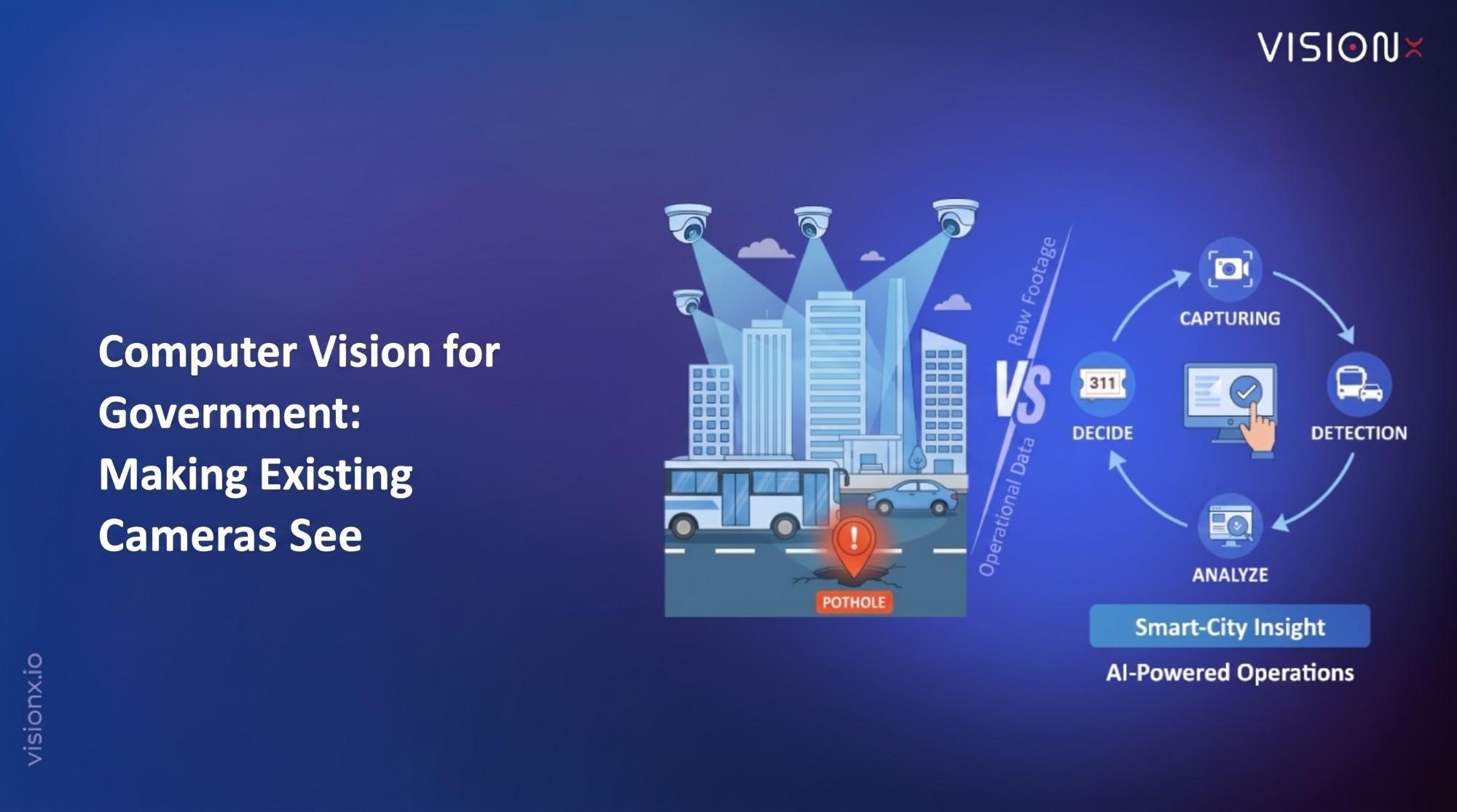
In Memphis, cameras on a city bus filmed the streets (opens in a new tab), and a machine-learning model learned to spot potholes and feed repair tickets into the city’s 311 system. That is computer vision: a field of artificial intelligence that enables computers to interpret images and video, detect objects, recognize patterns, read text, measure movement, and act on what they see.
For governments, it turns cameras already installed on roads, borders, buildings, and in public spaces into a source of real-time operational data.
That matters because most of those cameras are underused. Cities have spent a decade installing them. Very little of the footage is ever watched. Control-room operators often monitor many feeds at once, and the limits of human attention are well documented: experiments at Sandia National Laboratories, reported by the US National Institute of Justice (opens in a new tab), found that after only 20 minutes of watching monitor screens, most people’s attention fell “well below acceptable levels.”
Computer vision closes that gap. It watches every feed, every second, and surfaces only the moments that need a human decision.
Here is the part vendors rarely lead with: the hard part is not the AI. It is choosing the question the cameras should answer, and deciding who acts on the answer. All five programs profiled below, from Memphis to Singapore, started there.
This guide explains what computer vision is, how it works, where governments use it today, the risks to manage, and how to start with a 90-day pilot that proves value.
How computer vision works
Every computer vision system follows the same path from pixels to a decision.
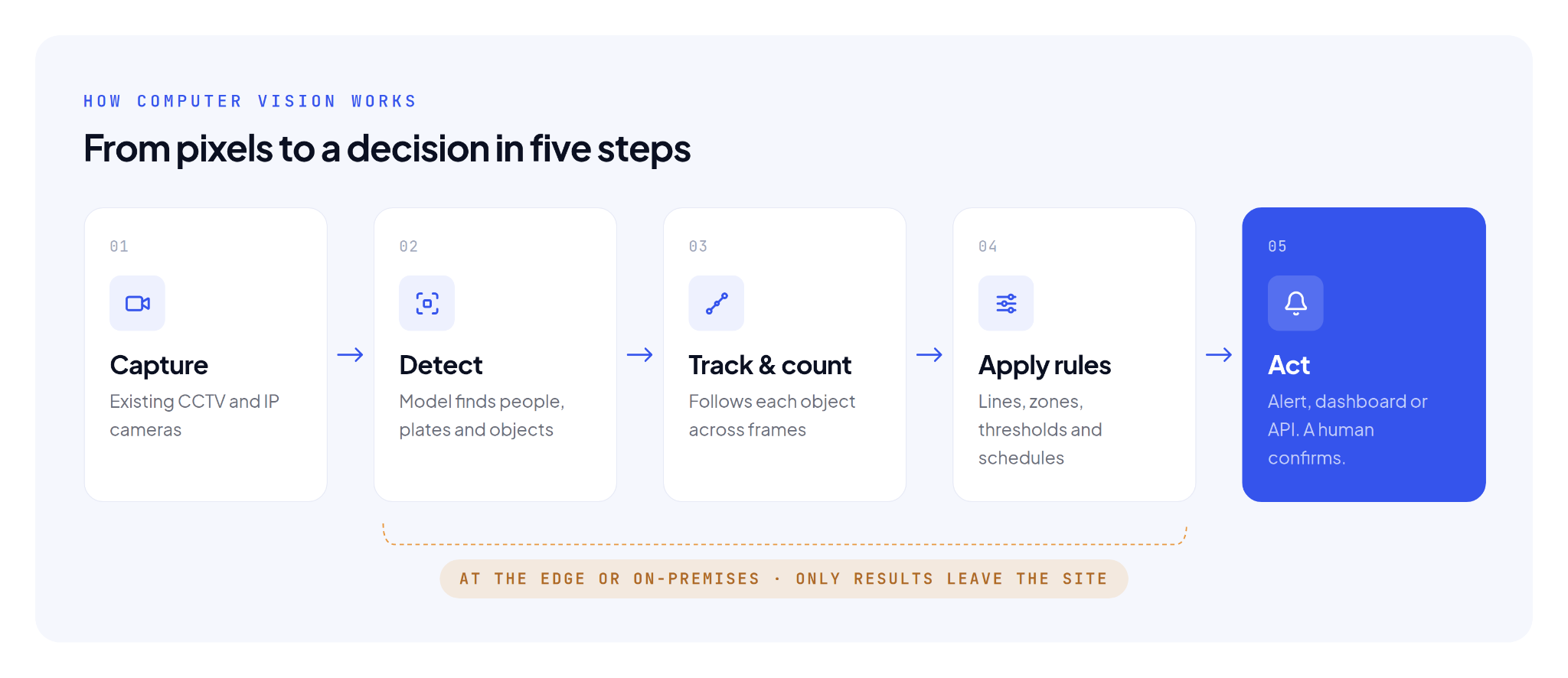
The model in the Detect step is trained on thousands of labeled images. It learns what a vehicle, a person, or a pothole looks like from many angles and in different light.
Newer vision-language models go a step further. They describe a scene in plain language and answer questions about it.
But the value for government sits in the last step. A system that alerts the right person, with the right clip, at the right moment changes operations, whereas a system that only records cannot.
Difference between computer vision and related terms
The terms overlap, and vendors often use them loosely. The table below explains what each one means.
| Term | What it is | Example in government |
|---|---|---|
| Computer vision | The branch of AI that interprets images and video | Reading license plates, counting crowds, spotting road defects |
| Artificial intelligence | The broad field of machines performing tasks that normally need human judgment | Chatbots for citizen services, forecasting, document processing |
| Video analytics | Computer vision applied to live or recorded camera feeds, usually with rules and alerts | An alert when a vehicle stops on a highway shoulder |
| Vision-language models (VLMs) | Newer models that describe images in plain language and answer questions about them | “Show me every camera where a gate was left open after 10 pm” |
| Facial recognition | One narrow, high-risk use of computer vision that identifies individuals | Border e-gates; tightly regulated and often out of scope |
The last row is the narrowest, and the riskiest. Most public-sector value comes from computer vision that counts, detects, and measures, not from identifying people. That distinction matters for privacy, for procurement, and for public trust.
Where governments use computer vision today
Computer vision applications in the public sector fall into six domains.
| Domain | What computer vision does | Typical owner |
|---|---|---|
| Traffic and roads | Reads license plates, counts vehicles, detects incidents and congestion, times signals | Transport authority, police, municipality |
| Public safety and events | Measures crowd density, flags unattended objects, detects falls and fights | Interior ministry, event authority, civil defense |
| City operations | Turns existing CCTV into live alerts and dashboards for a command center | Municipality, smart-city office |
| Infrastructure and assets | Spots cracks, corrosion, and damage on structures, power lines, towers, and pipelines from camera or drone footage | Roads authority, utilities |
| Borders, ports, and facilities | Reads container codes and plates at gates, checks PPE on sites, controls access | Customs, port authority, facilities |
| Citizen services | Measures queues and wait times at service centers, reads scanned documents | Service centers, registries |
Computer vision in government around the world: what the results show
Cities and agencies on four continents have put computer vision into daily operations. Five published examples show the range and the results.
| Where | What it does | Reported result |
|---|---|---|
| Memphis, USA | Cameras on a city bus and a code-enforcement vehicle filmed streets; models spotted potholes and the pilot automated 311 ticketing | Detection accuracy rose from 50% to over 90% during the proof of concept; the city expects fewer potholes to save $10,000 to $20,000 a year in damage claims |
| Amsterdam, Netherlands | The Public Eye system counted pedestrians at Dam Square, the Marineterrein, and around the Johan Cruijff ArenA. | About 90% counting accuracy; staff saw only numbers and video was deleted as soon as it was counted (ran 2019 to 2021) |
| New South Wales, Australia | Mobile phone detection cameras spot drivers holding a phone at the wheel | Almost 70,000 drivers caught in the first six months of enforcement (2020) |
| London, UK | ANPR cameras enforce the Congestion Charge, Ultra Low Emission Zone, and other road user charging schemes | A network of 1,544 ANPR cameras: 981 for enforcement and 563 for monitoring (TfL, January 2023) |
| Singapore | The Land Transport Authority is adding AI-powered video analytics to traffic incident detection | Rolling out progressively so motorists are warned of incidents earlier (Ministry of Transport, August 2026) |
Three lessons stand out across these five. First, each started with one clear operational question. Second, several put cameras on assets the agency already had, such as a Memphis city bus. Third, the strongest programs, such as Amsterdam’s, published how the system works and what happens to the footage.
None of these depended on having the most advanced AI. They depended on good planning.
Why the GCC is moving fast
National AI strategies in Saudi Arabia and the UAE both prioritize AI in government services, and Saudi Arabia’s strategy also includes a strong focus on mobility and smart cities. This makes computer vision a highly relevant part of the scope, as explained below:
- Saudi Arabia. The National Strategy for Data and AI (opens in a new tab), launched by SDAIA in 2020, aims to place the Kingdom among the world’s leading AI nations. Priority sectors include government and mobility, with mobility goals such as smart mobility systems and improved urban traffic safety. Giga-projects and smart cities are named as test beds for AI.
- UAE. The UAE National Strategy for Artificial Intelligence 2031 (opens in a new tab) sets eight objectives, including adopting AI across government services. It also names traffic safety as one of the challenges AI should help solve.
- The camera base already exists. Roads, metros, airports, ports, and event venues across the region are heavily instrumented. Computer vision adds intelligence to that installed base. It does not require new infrastructure.
As a result, agencies are being asked to show measurable AI outcomes. Using computer vision on existing cameras is often the fastest way to deliver them.
The risks to manage
Computer vision earns public trust only when agencies set the rules before the cameras go live. Five questions belong in every business case.
- Privacy. Does the use case need to identify people, or only count and detect them? Choose the least intrusive option. Blur faces and plates at source when identity is not required.
- Data residency. Where is video processed and stored? On-premises or in-country edge processing keeps footage within national borders and under the agency’s control.
- Accuracy and bias. How was the model tested, on whose data, and in what conditions? Ask for accuracy measured on local footage, including night, heat haze, dust, and crowded scenes.
- Accountability. Who reviews an alert before action is taken? A human should confirm any decision that affects an individual.
- Lock-in. Does the system work with the cameras and video management software you already own? Camera-agnostic platforms protect existing investment and future procurement.
How to start: a five-step pilot
The quickest way to see results is to start small: one use case, one site, and a clear way to measure success.
- Pick a question, not a technology. “How long do trucks wait at Gate 3?” beats “deploy AI cameras.”
- Audit the cameras you have. Most pilots need no new hardware. Check angles, resolution, and network access.
- Set the baseline and the target. Measure today manually for one week. Agree what improvement justifies scaling.
- Run a 90-day pilot on one site. Process video on-premises or at the edge, with privacy settings and success measures agreed up front.
- Decide with evidence. Compare AI results with the manual baseline, then scale, adjust, or stop.
Agencies that start this way usually find the second and third use cases on the same cameras. That is where the return compounds.
FAQ
Frequently asked questions
Computer vision is AI that lets computers see. It analyzes images and video to detect objects, read text, count people or vehicles, spot unusual events, and report what it finds.
Automatic number plate recognition (ANPR) is a common example. A camera reads a vehicle’s plate and checks it against a list in under a second, at toll gates, parking lots, and borders.
No. Computer vision is one branch of artificial intelligence. AI also includes language, prediction, and planning systems that do not work with images.
No. Facial recognition is one narrow use. Most government computer vision counts, detects, and measures without identifying anyone.
Usually, yes. Most modern IP cameras can feed a computer vision platform. A site survey confirms which camera angles and resolutions are suitable.
It depends on the deployment. Edge and on-premises processing keep video inside the agency’s facilities, which supports data-residency requirements.
Talk to VisionX about computer vision for your agency
The cameras are already up. The footage is already flowing. What most agencies lack is not another platform. It is a single, well-posed question, and someone ready to act on the answer.
The cameras can tell you how long trucks wait at Gate 3.
VisionX has run Vision AI in production since 2017. We have built and deployed for government and enterprise across the GCC: on your cameras, at the edge, on-premises or fully air-gapped, and in Arabic. We are ISO 27001 certified. Every engagement starts with a 90-day pilot on one site, with a clear go or no-go against goals agreed at the start.
Explore Government solutions · [Book a briefing]